e challan Chandigarh: Check Traffic Challan Status & Pay Fines
Verify eChallan chd fines in 60s with official data. Secure Chandigarh payments, instant receipts. Trusted by 1M+ users for status checks.

What is Traffic eChallan?
The Traffic eChallan is the digital, paperless alternative to traditional fine slips, issued by authorities for violations like speeding, illegal parking, or signal jumping. Through this system, drivers can easily perform an e challan check, view detailed e challan details, track e challan status, and complete e challan payment without queues or paperwork hassles.
This online e challan check portal simplifies tracking your driving record across India. Real-time offenses show on mParivahan - e challan check by vehicle number to view dues for cars/bikes.
Check Challans In Other States and Pay Online

Check & Pay Your Traffic FinesOnline Via MyMotor

Check using
MyMotor
Monitor and clear your traffic fines instantly from any device.
1
Search & Track Your Vehicle Challans
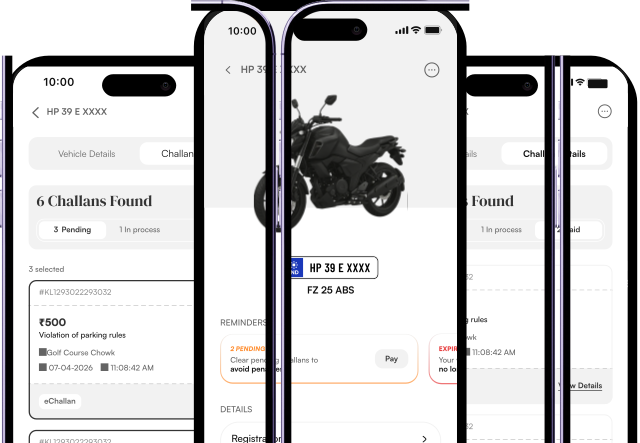
Provide your vehicle number, search for challans and instantly see each offence date, time, location, fine amount, accused name, and payment status in one place before eChallan online payment.
2
Secure Payment
Click on the “Pay Challan” button below the Challan Amount, and pay using your preferred method like UPI, or net banking through our secure payment gateway.
3
Success Status Update
Once the transaction is complete, the challan status is updated on the government’s portal within 24-72 hours in most cases, and rarely up to 7 days.
4
Payment Receipt
Download your challan payment receipt instantly after a successful payment so you always have digital proof on your phone.
MyTransactions (In MyMotor App)
Open the MyMotor app, and check the "MyTransactions" section inside Menu, all your past challan payments, date and statuses are maintained for easy tracking.
Recommended

Check using
Parivahan Portal
Visit the official government website and:
1
Visit the Parivahan eChallan Page
Go to vahan.parivahan.gov.in/eChallan
2
Login
Enter your registered mobile number or driving license details.
3
Retrieve Your Challans
Choose the specific challan, verify the offence details and amount due.
4
Make Payment
Pick your preferred option to pay and complete the transaction.
5
Get Confirmation
You'll get an SMS/email with transaction ID & e-receipt for your records.

Check using
State Traffic Police Website
State Traffic Police provides challan details through its official portal linked with enforcement cameras across the state. This is commonly used for state-level challans.
1
Open the Official Portal
Navigate to your state's Traffic Police eChallan payment page.
2
Enter Vehicle or Notice Number
Fill in your registration plate or challan reference to view pending fines.
3
View Outstanding Fines
The system will list each violation, fine amount and status.
4
Proceed to pay
Select the challan you want to clear and click the payment button.
5
Receive Instant Receipt
After payment, an SMS or email confirms your successful transaction.

Everything Your Vehicle Needs
In One App
Get reminders before insurance & PUC expire, renew insurance, store vehicle docs safely, and pay challans with ease