
You missed paying your traffic challan and now it has been sent to court.
Does that mean a compulsory court visit? Not always.
Some court challans can be paid online through a Virtual Court, while others need an in-person appearance.
Here’s how to check which one applies to you and how to settle it the right way.
First - How Do You Know If Your Challan Actually Needs Court Settlement?
Well, the simplest way to confirm whether your challan needs court settlement is to check its current status on the official e-challan portal.
You can search using your:
- Challan number
- Vehicle registration number
- Driving licence number
If the payment option is available, it is usually a regular e-challan that can still be paid online.
However, if the status says “Sent to Court”, shows a court name or directs you to the Virtual Courts portal, then the challan has entered the court settlement process.
How to Settle It Online If It's Eligible for Virtual Court
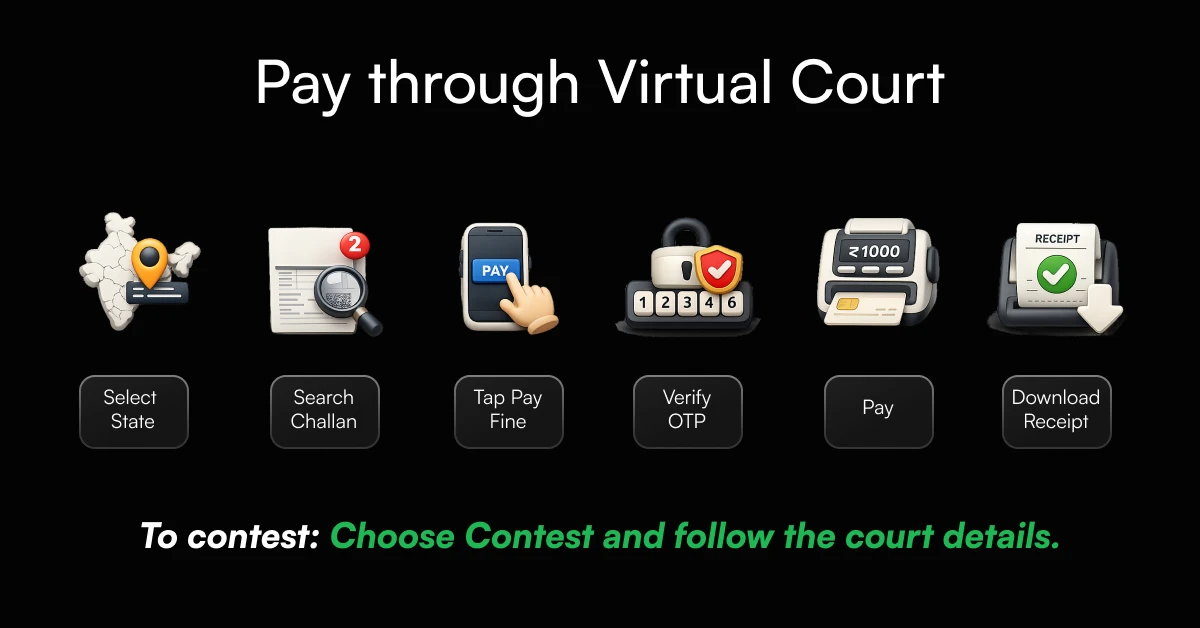
A Virtual Court challan can often be settled online without visiting a physical court.
Once your challan appears in the Virtual Court system, you can either use the official portal or check and pay it through MyMotor.
Step-by-Step: Pay Through the Virtual Court Portal
Here is how to pay your challan in Virtual Court:
- Visit the official Virtual Courts portal.
- Select your state and department.
- Search for the case using your mobile number, CNR number, party name, or challan/vehicle number.
- Open the case and review your offence and fine details.
- Choose Pay Fine.
- Complete OTP verification.
- You will be redirected to ePay to complete the payment.
- Download the acknowledgement or receipt after a successful transaction.
You may also see an option to contest your challan. In that case, the portal will provide the physical court details and hearing date.
How Can You Check and Settle the Same Challan Through MyMotor’s Challan Search?
Here, MyMotor gives you an easier way to perform an e-challan status check and view pending fines using your vehicle number.
To check challan status online through MyMotor:
- Open MyMotor’s Challan Search.
- Enter your vehicle registration number.
- View your pending and court-related challans.
- Check the offence date, fine amount and current payment status.
- Select the eligible challan and complete the payment.
- Save the receipt and track your transaction from the MyMotor app.
This makes the challan status check easier because you can view and pay eligible challans without moving between different government portals.
How to Settle It Offline at a Physical Traffic Court
If your physical court challan cannot be paid online, check the challan status for the court name, address and hearing date.
A regular court challan must usually be handled at the court mentioned in the notice, not at any traffic court of your choice.
Official e-challan records may display the assigned court and its address once a challan is sent there.
Visit the court on the given date, complete any needed verification and follow the magistrate’s directions.
Also, the court may decide a different fine amount from the one shown on your original challan.
What Documents to Carry and How Counter Payment Works?
So, before visiting the court, make sure to carry:
- A copy or screenshot of the challan or court notice
- Your original driving licence
- Vehicle RC
- Valid insurance and PUC certificate
- A government-issued photo ID
- Supporting proof if you want to contest the challan
- Photocopies of your important documents
At the court, go to the traffic challan or filing counter and share your challan or case details.
Depending on your offence, you may be asked to appear before the magistrate.
Once the fine is confirmed, pay it using the payment method accepted by the court and collect the official receipt before leaving.
Online vs Offline: Which One Applies to Your Challan?
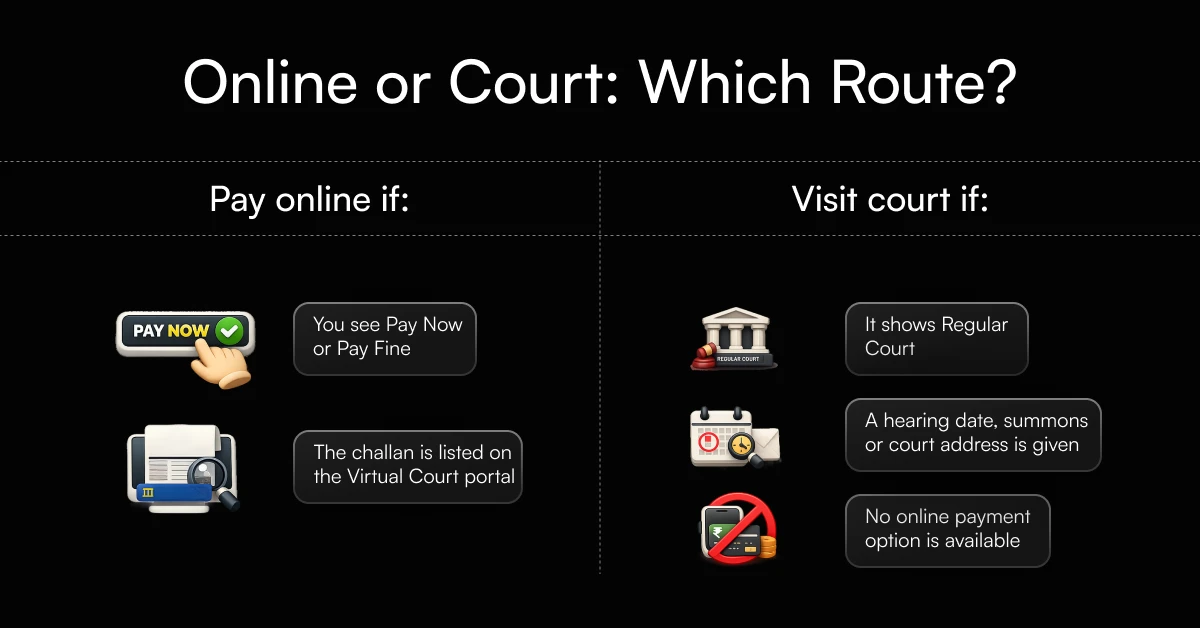
The right route depends on what your actual challan status currently shows.
If your e-court challan has a Pay Fine option on the Virtual Court or e-challan portal, you can usually complete the court challan online payment.
But if your challan has been transferred to a regular court, shows a hearing date or does not offer an online payment option, you may need to visit the assigned court.
Decision Checklist: Which Route Should You Choose?
| Question | If Yes | If No |
|---|---|---|
| Does the challan show a Pay Now or Pay Fine option? | Pay it online. | Check the court details. |
| Is it listed on the Virtual Court portal? | Complete the payment online or choose to contest it. | Check whether it has moved to a physical court. |
| Does the status mention Regular Court or show a court address? | Visit the mentioned court. | Continue checking the available online route. |
| Has a hearing date or summons been issued? | Follow the court instructions and appear if needed. | Online settlement may still be available. |
| Do you want to contest the offence? | Choose Contest online, if available, or appear in court. | Pay the fine through the available route. |
What If You Want to Contest Instead of Pay?
You can contest a traffic challan if you truly believe it was issued incorrectly for example, the vehicle details are wrong, you were not at the stated location or you have evidence that no violation occurred.
Here is how to contest a traffic challan in very easy steps:
- Open the challan on the official Virtual Courts portal.
- Review the offence, date, location and vehicle details.
- Select Request to Contest instead of Pay Fine.
- Complete the OTP verification.
- Follow the instructions provided for the assigned court or hearing.
Keep supporting proof such as photos, videos, payment records or relevant vehicle documents ready.
For incorrect e-challan details, you can also raise a grievance through the official e-challan portal.
Once you choose to contest, do not pay the fine unless the court directs you to do so.
How Do You Confirm the Challan Is Fully Settled?
A successful payment alone does not always mean the challan status has been updated.
To confirm that the challan is fully settled, check that it shows Paid, Disposed or Closed, and keep the official receipt or transaction ID.
Where to Check the Receipt and Updated Status
1. On MyMotor:
Open the Challan section and select your vehicle to check challan status. You can also view your previous payments and their status easily on the app.
2. On the Virtual Court portal:
Search using your mobile number, CNR, challan number or vehicle details. Confirm that the case shows as paid or disposed and download your receipt.
3. On the Parivahan eChallan portal:
Use your challan, vehicle or driving licence number for an e-challan status check.
Review the payment status, transaction details and challan receipt.
If your challan status check still shows pending after payment, do not pay again.
Keep the transaction reference and raise a payment-status query on the relevant portal.
What Happens If You Delay Settling It Further?
If you keep delaying payment, the challan may be transferred to a Virtual Court or regular traffic court.
Once this happens, the normal online payment option may no longer be available, and you might receive a court notice or hearing date.
So, after how many days does a challan go to court?
There is no single timeline across India, it can vary by state, offence and traffic authority.
Make sure to always follow the payment deadline shown on your challan.
And if you are wondering what happens when a challan is sent to court, you will need to settle it through the Virtual Court portal or appear at the assigned physical court.
Ignoring your case further can lead to additional legal action, so it is best to check the status and act promptly.