
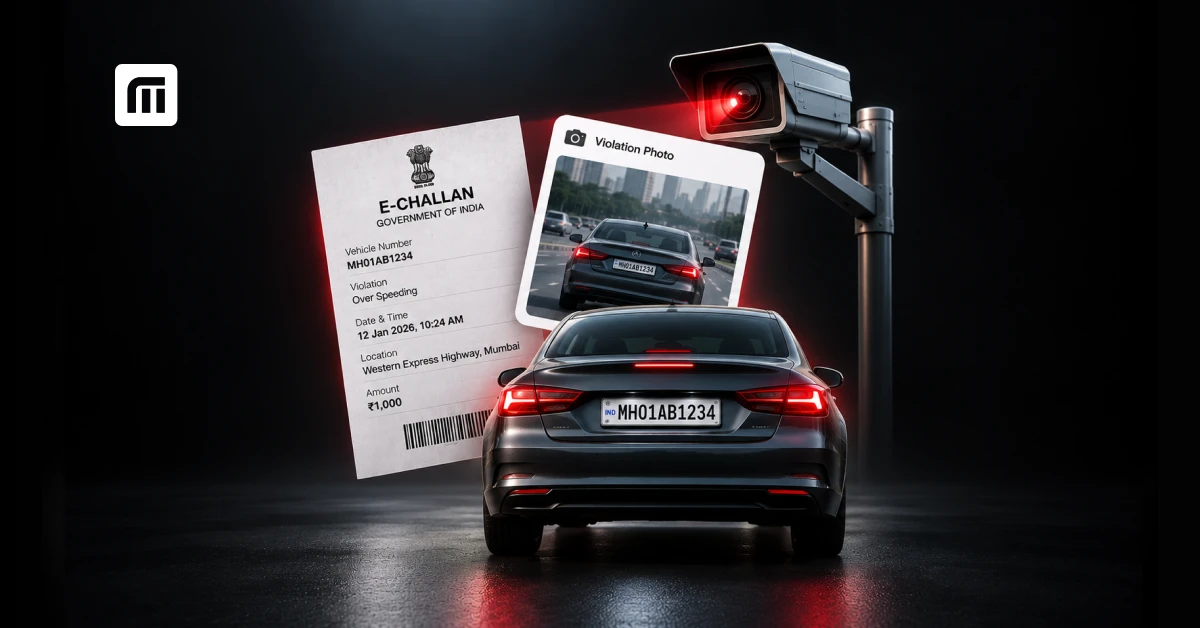
You can check a challan with photo by entering your vehicle number or challan number on the official e-Challan portal or a service like MyMotor. If a camera caught the violation and the issuing authority makes the proof available, you can see the evidence image along with your challan details. Not every challan has a photo: camera-based challans usually do, while manual or on-spot challans often do not.
Received a traffic challan and want to see what you were actually fined for? Before you pay, check the proof. Where and how the photo appears differs by state, city and traffic authority. Here is how to find the photo evidence, verify the details, and what to do if something does not add up. You can start right away with MyMotor's challan check tool.
What Is a Challan Photo and Why Do Traffic Police Send It?
A challan photo is visual proof connected to a traffic violation. For example, if a traffic camera records a vehicle crossing a red light, the captured image may be linked to your e-challan. It shows what was recorded when the alleged violation took place.
For you as a vehicle owner, challan photo evidence is useful for one more reason: it lets you check whether the vehicle in the image is actually yours before you pay or dispute the challan.
What Does the Evidence Image of an e-Challan Actually Show?
It depends on the violation and the enforcement system. An e-challan image proof may show your vehicle, number plate, the road or junction, and other details related to the violation. An overspeeding challan may include an image captured by a speed enforcement camera, while a red-light violation may show the vehicle at or near the signal.
Do not rely on the photo alone. Always compare it with the written challan details, especially your vehicle number, date, time, location and type of violation.
Which Violations Are Captured with Photos?
Camera-based traffic enforcement can be used for violations such as:
- Red-light jumping
- Over-speeding
- Riding without a helmet
- Driving without a seatbelt
- Wrong-side driving
- Triple riding
Which violations are detected automatically depends on the cameras and enforcement technology used by the traffic authority. Some systems also use ANPR (Automatic Number Plate Recognition) to read registration plates and link the recorded violation to a vehicle. That is why an ANPR camera challan can reach you even though no traffic officer stopped you or was in sight.
Why Do Some Challans Have No Photo?
There are a few possible reasons:
- Your challan was issued manually by a traffic officer.
- The issuing authority does not display proof images publicly on the portal you are checking.
- The evidence is available through a separate state or city traffic police system.
A challan without a visible photo is not automatically wrong or invalid. Instead of judging it by whether a photo appears, check the issuing authority, vehicle details, date, location and violation mentioned on the challan.
How Do You Check a Challan with Photo Online?
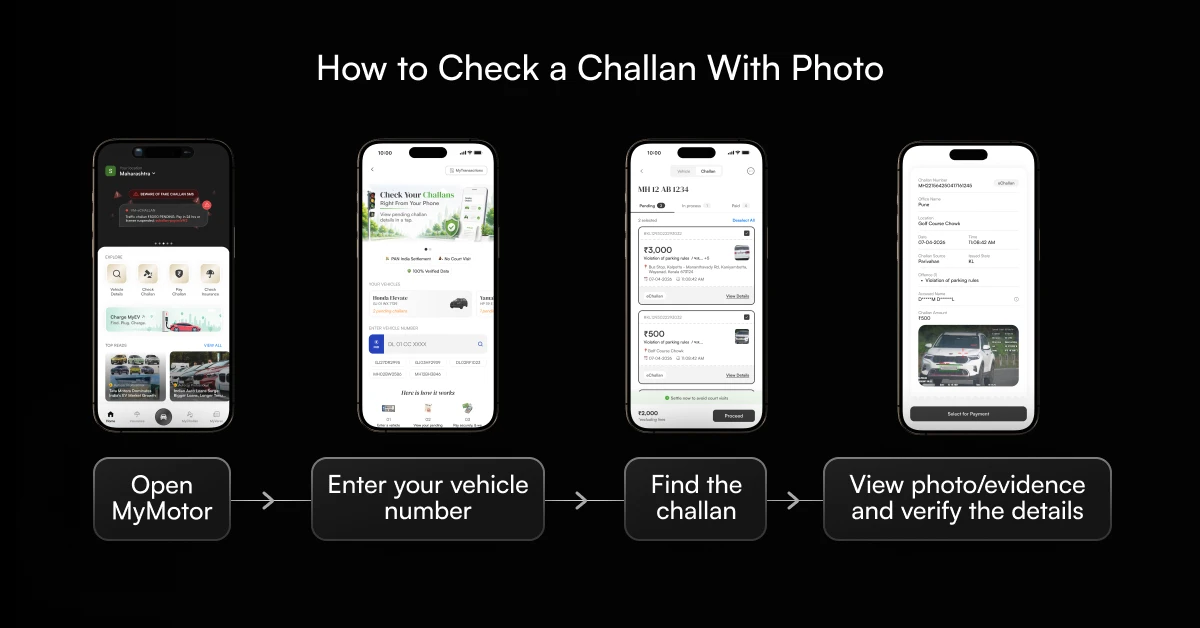
To check a challan with photo online, find the challan record and open its complete details. The exact layout differs between portals, and if you do not see an image, it does not mean there is no proof.
The basic process:
- Open the official e-Challan portal or a trusted challan checking app such as MyMotor.
- Enter your vehicle number or challan number.
- Complete the required verification.
- Find the relevant challan in the results.
- Open the complete challan details.
- Look for the available evidence, photo, image or violation details.
- Match the image with your vehicle number, date, location and offence.
For a full walkthrough of the portal itself, see our guide to checking an e-challan online.
How to Check a Challan with Photo Using Your Vehicle Number
If you do not have your challan number, your vehicle registration number is the best place to start. Enter it on the official e-Challan portal or a supported challan checking app to see the challans linked to your vehicle. You can also enter your vehicle number on MyMotor to see your challan details.
Once you find the challan, open its complete details and look for the evidence image, where available. This is usually the easiest way to check a challan with photo by vehicle number, especially if you only have an SMS and not the full challan notice.
How to Check a Challan with Photo Using the Challan Number
If you already have your challan number, use it to search for that specific record. Enter it on the official e-Challan portal and complete the verification. When the challan appears, open it and check the offence, date, amount, status and available evidence. If the issuing authority has made the image available online, you may be able to see it in the detailed challan record.
Can You Check a Challan with Photo Using a Driving Licence Number?
The official Parivahan e-Challan portal currently offers an option to search using a driving licence number. However, finding a challan is different from seeing its photo. Your DL number may help you locate associated challan records, but it does not guarantee a photo. That still depends on how the challan was issued and whether the authority makes the evidence image available online.
How to Check a Challan with Photo on Your Phone
You do not need a laptop for an e-challan check with image. Open the e-Challan portal in your mobile browser or use a vehicle-services app, enter your vehicle or challan details, and open the record. You can also search your vehicle number on MyMotor from your phone.
If you are searching for how to see a challan photo on mobile, remember to open the individual challan. The results page may show only basic information, while additional details or proof appear after you open the complete record.
How Do You Download or View the Evidence Image of Your Challan?
Finding your challan does not always mean the photo is there too. Most portals first show basic information such as the offence, date, fine and status. You may need to open the individual challan to view the challan proof or other details.
Where Do You Find the "View Evidence" or Image Option?
There is no standard interface used by every traffic authority. Depending on the portal, the image may appear under challan details, offence details or an evidence section. If you cannot find it, first check which authority issued the challan, because your state or city traffic police may have its own portal with more information.
The key is to open the complete challan record, not just the summary shown in search results or in the SMS you received.
Can You Download the Challan Photo or Take a Screenshot?
Yes. If the portal offers a download option, save the image or evidence. If the image is only shown on screen, keep a screenshot for your records, especially if you think something is wrong and plan to raise a complaint. Also save your challan number and related details, since you will most likely need them if you contact the issuing authority.
What If the Challan Photo Is Blurry or the Number Plate Is Unclear?
Do not rely on a blurry image alone. Check the rest of the information attached to the challan:
- Does the registration number match yours?
- Is it the same type of vehicle?
- Do the date and location make sense?
- Does the violation mentioned match what you can see?
If the photo seems to show another vehicle, or the number plate appears to have been read incorrectly, keep a copy of the evidence and raise the issue with the authority.
Why Is the Photo Not Showing on Your Challan?
A missing photo alone does not make your challan invalid. Not every challan comes with photo evidence, and for camera-based challans the image may be missing because it has not been uploaded or synced yet, or because of a temporary portal issue. Check the vehicle number, violation, date, location and issuing authority to make sure the details match.
Is the Challan From a Manual (On-Spot) Stop?
If a traffic officer stopped you and issued the challan directly, there may be no camera image attached. Manual enforcement and camera-based enforcement do not work the same way. If you remember being stopped and given the challan on the spot, the missing photo may simply mean it was not generated from a traffic-camera image.
Has the Challan Been Uploaded to the Portal Yet?
If your challan was issued recently, its information may not appear across every service at the same time. If you see incomplete details, check again through the official portal or the issuing traffic authority. Do not assume a missing e-challan image means the challan does not exist.
Does Your State or City Traffic Police Portal Host Its Own Images?
Challan information is not displayed in the same way everywhere in India. Some state or city traffic police departments use their own systems or present evidence differently from the central e-Challan service. If the image is not showing where you are checking, identify the issuing authority and see whether its official portal gives more information.
How Do You Verify That the Photo Actually Matches Your Vehicle?
Before you pay, spend a minute checking the proof properly. The registration number is the obvious place to start, but it should not be the only thing you look at.
What Details Should You Cross-Check?

Check these details together:
- Number plate: Does the registration number in the photo match yours?
- Vehicle type: Is it the same type of vehicle? A bike should not be linked to a photo showing a car.
- Date and time: Could your vehicle reasonably have been there at that time?
- Location: Do you recognise the road, signal or area mentioned?
- Violation type: Does the evidence show the same offence mentioned on your challan?
Checking all five helps you spot an obvious mismatch before you make a payment.
What If the Photo Shows a Different Vehicle or a Misread Number Plate?
Sometimes the registration number on the challan is yours, but the vehicle in the photo looks nothing like yours. Or another vehicle has a similar plate and one character was read incorrectly.
If you are dealing with a wrong challan on your vehicle, do not ignore it, but do not rush to pay it either. Save the challan number, take a screenshot of the challan with the wrong vehicle photo, keep your RC at hand and collect any information that supports your case. Then raise the issue through the grievance process given by the issuing authority.
What Should You Do If the Challan Photo Is Wrong or You Disagree?
If something truly does not match, raise it with the authority that issued the challan. The exact correction or dispute process may differ, so first identify the issuing traffic department.
How Do You Contest a Challan with Photo Evidence?
Start by checking whether the issuing authority provides an online grievance, complaint or wrong-challan facility. When you submit your complaint, explain the problem clearly. For example:
- The vehicle shown in the image is not mine.
- The registration plate in the evidence is not the same as my vehicle.
- My vehicle was not at this location at the stated time.
Attach supporting documents wherever the process allows. If you are searching for how to dispute an e-challan, the most important step is to use the grievance route given by the authority that actually issued it, instead of sending your complaint through a random portal.
Can You Take Your Challan to a Virtual Court?
Some traffic challan cases can be handled through India's Virtual Courts system, depending on the jurisdiction and the current status of the case. If your case is available on the Virtual Courts portal, you may see options to pay or contest the matter. But not every challan can be moved to a Virtual Court whenever you choose. Check the current status of your case and follow the options shown for your challan.
What Documents Should You Keep Ready?
Keep your basic vehicle and challan documents handy:
- RC
- Driving licence, where relevant
- Challan number
- Screenshot or copy of the challan
- Evidence image
- Any supporting proof
If you are arguing that your vehicle was not at the location, useful proof can include toll records, parking receipts, dashcam footage or other records. You do not need to collect everything. Focus on evidence that directly explains why you believe the challan is wrong. You can also look up your RC and vehicle details on MyMotor to confirm what is registered against your number.
How Do You Pay a Challan After Checking the Photo?
If you have checked the evidence and everything matches, you can go ahead with the payment option available for your challan. Before paying, look at the registration number, violation, amount and payment status.
How to Pay an E-Challan Online Step by Step
- Find your challan.
- Open its complete details.
- Check the vehicle number and violation.
- Confirm the fine amount and status.
- Select the available payment option.
- Complete the transaction.
- Save your payment receipt or acknowledgement.
To make this easier, you can use MyMotor to search for pending challans and check available payment options for eligible challans. After paying, keep your receipt until the challan status shows successful payment.
What Happens If You Don't Pay on Time?
There is no single payment deadline that applies to every traffic challan across India. The timeline and next steps depend on the issuing authority, the type of challan and the jurisdiction. Always check the due date, instructions and current status shown against your specific challan.
If a challan stays unpaid, it may move to further enforcement or court proceedings, depending on the applicable process. So instead of relying on a generic "pay within X days" rule, check your actual due date.
Can Unpaid Challans Block Insurance Renewal, Vehicle Sale, or RC Transfer?
A pending traffic challan does not mean your motor insurance cannot be renewed. However, pending challans or offence records can affect some vehicle-related transactions, depending on your state, the type of transaction and the status of the case.
If you plan to sell or transfer a vehicle, check for and resolve pending challans beforehand. When you renew, it also helps to know which documents you need for bike insurance or car insurance. And if you are buying a used vehicle, a pending challan check before purchase can save you real trouble. Our guide to RC ownership transfer explains the RTO side.
Does Checking a Challan Photo Cost Anything? Is It Safe?
Checking whether a challan exists through the official e-Challan portal is free. You do not need to pay anyone just to search for a challan linked to your vehicle. You should, however, be careful about where you enter your vehicle and payment information.
Is It Free to Check a Challan with Photo?
Yes. You can check your challan details on the official e-Challan portal without paying any fee to search for the record. You can also search your vehicle number on MyMotor to check available challan information. Keep in mind that checking a challan and paying a challan are two different things. If you have an unpaid challan, you still need to pay the applicable fine through the available payment channel.
How Do You Avoid Fake Challan Websites and SMS Scams?
Got a message saying you must pay a traffic fine on the spot? Do not rush to click the link. A safer approach is to open the official challan portal yourself and search using your vehicle or challan details. Be especially careful if a message asks for an OTP, password or banking details through an unfamiliar link. If you are worried about a fake challan SMS, checking the record on your own is much safer than trusting the link in the message.
Read: Spot E-Challan Scams 2026: Avoid Fake Traffic Fines Now
How Often Should You Check Your Vehicle for New Challans?
You do not need to check every day, but checking now and then is useful, especially if you regularly drive through areas with camera-based enforcement. It also makes sense to check after receiving a challan message, or before an important vehicle transaction.
Why Do Camera Challans Arrive Weeks After the Violation?
A camera recording a violation is only one part of the process. The incident still needs to be processed and linked to the relevant vehicle record, and how quickly that happens depends on the enforcement system and traffic authority. A camera-based challan may not become visible to you right after the alleged violation. That is also why waiting for an instant SMS is not the best way to know whether your vehicle has a pending challan.
Should You Check Before Selling or Buying a Second-Hand Vehicle?
Yes. It is an easy check that can save trouble later. If you are selling, checking pending challans lets you resolve them before the transfer. If you are buying, do not rely only on what the seller tells you. Along with the RC, ownership and insurance information, look for pending challans linked to the vehicle. You can search the vehicle number on MyMotor to check available vehicle and challan information before you decide.
Also get renewal and challan alerts on the MyMotor app.